
Setting up a correct FROM display name and email signature in MS365
Making sure your FROM DISPLAY NAME is correct for users getting an email from you is important. If your from name is "Info" it could be from anyone and reflects poorly on your business. Your should also have a signature, it's free marketing. Here's how to sort this in MS365.
CHANGING YOUR DISPLAY NAME
- Log into your online 365 account (not the email client you are using like Outlook),
- Go to the ADMIN area (not emails), you will find the icon under the 9 dots icon top left.
- Then under USER MANAGEMENT click on EDIT A USER
- Click in the search box and select the email address you want to edit.
- Click EDIT USER at the bottom.
- Under phone number click on MANAGE CONTACT INFORMATION.
- Then change the DISPLAY NAME as required. I'd recommend your name, your company name, or if it's generic email address perhaps "The team at Alpha Tango". As long as users can see it's from you that's whats important.
- Click SAVE at the bottom.
- Test but sending an email to yourself.
If you are using Gmail see https://support.google.com/mail/thread/476179715/i-need-to-change-the-from-name-in-one-of-my-email-accounts-but-not-all-of-them?hl=en
ADDING A SIGNATURE TO YOUR EMAILS
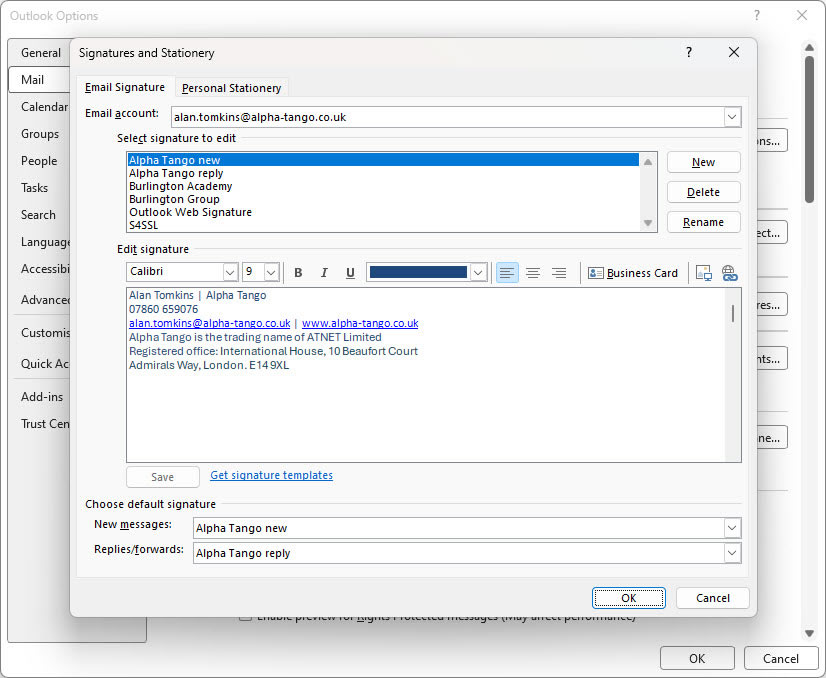 Your signature is setup in your client, for example MS Outlook. Unfortunately it's specific to the client, so if like me you have email accounts on your phone you will need to set a signature up there as well.
In Classic Outlook go to:
- File from the top menu.
- Options (bottom left).
- Click on MAIL
- In the top box pick the email address for the new signature.
- Click NEW and create a signature.
- I have 2, one for new emails I create and one for replies.
- At the bottom where it says SELECT DEFAULT SIGNATURE add the email signature for the email address at the top. I use 2 different ones as stated above.
- Click OK.
- Test by opening a new email.
LEGISLATION
Just so your aware, an email is classed as correspondence, same as a letter, and legally you should have your companies registered address in your signature. That aside, you should have your name, email address (in case users want to add you to their contacts) phone no, and website URL.
As an example here is my NEW EMAIL signature:
Alan Tomkins | Alpha Tango
07860 659076
alan.tomkins@alpha-tango.co.uk | www.alpha-tango.co.uk
Alpha Tango is the trading name of ATNET Limited
Registered office: International House, 10 Beaufort Court
Admirals Way, London. E14 9XL
Here is my REPLY EMAIL signature:
Alan Tomkins | Alpha Tango
07860 659076
alan.tomkins@alpha-tango.co.uk | www.alpha-tango.co.uk
